For modern e-commerce brands, achieving AI product photography accuracy is the difference between scaling profitable ads and dealing with costly customer returns.
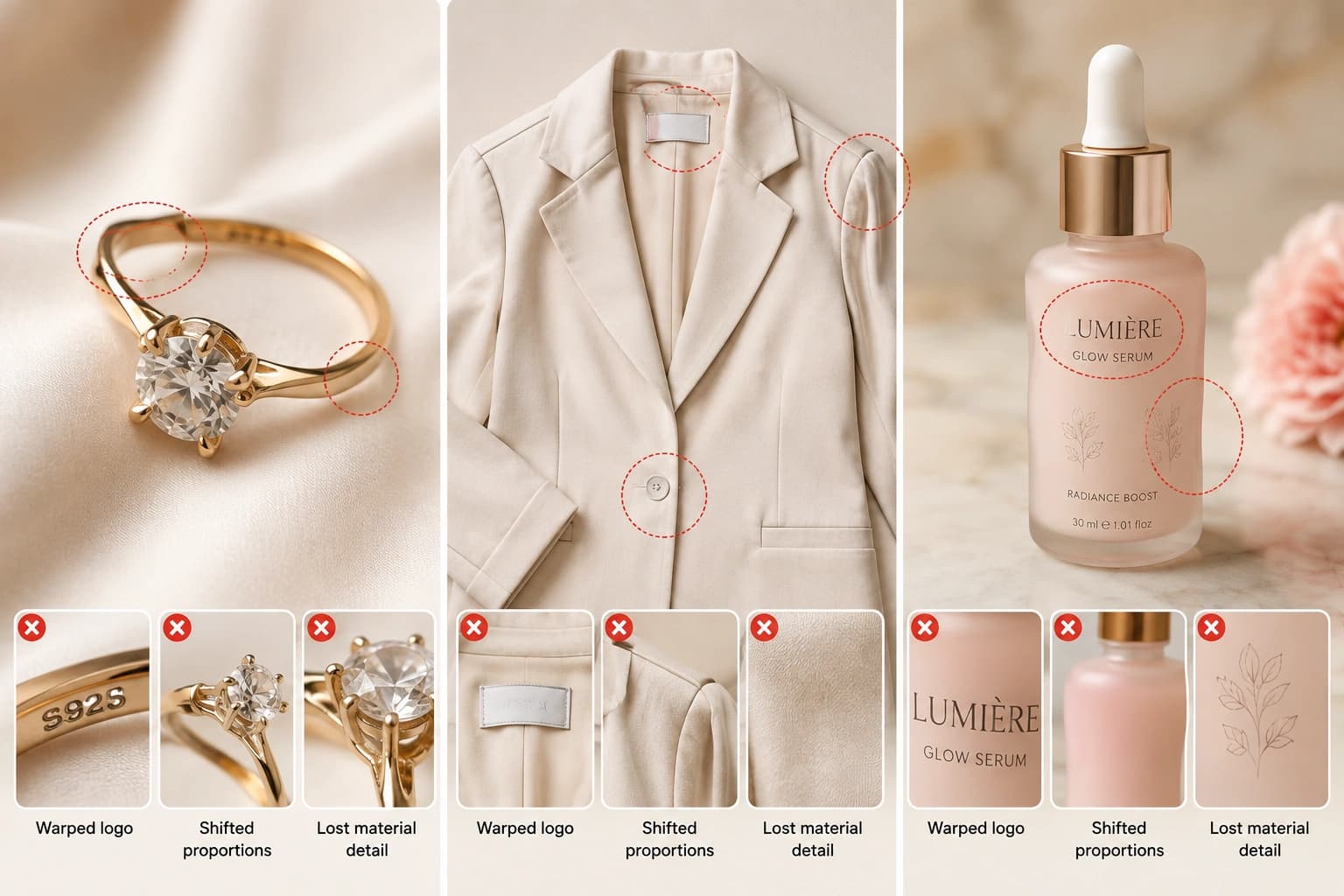
At first glance, standard AI-generated visuals look impressive: lighting is clean, compositions feel studio-ready, and backgrounds fit the brand aesthetic. But when you zoom in, critical flaws emerge. A logo is subtly warped, label text becomes unreadable, product proportions shift, or colors drift away from the real physical item on your shelf.
That gap between an image that merely looks attractive and one that maintains true-to-life precision is a major risk for online retailers. In 2026, visual quality without exact product fidelity is no longer acceptable. When the asset a shopper sees on your product page or ad doesn’t match the physical package delivered to their door, brand trust drops and refund rates climb.
High-growth brands bypass these issues entirely by treating AI as a background staging engine rather than allowing it to hallucinate the product itself. Here is the step-by-step workflow top teams use to produce accurate ai product photography that preserves logos, colors, and textures across every SKU.
What Is Product Fidelity in AI Product Photography?
Product fidelity is the degree to which an AI-generated product image preserves the exact visual identity of the real product. That includes its silhouette and proportions, color, material finish, logos and text, seams, hardware, surface textures, packaging details, and consistent appearance across different angles and scenes.
Generic AI image models do not capture a product in the same way a camera does. Instead, they reconstruct an approximation based on patterns learned during training. Each generation can therefore introduce subtle changes, even when the image looks highly realistic.
That is why an AI-generated product photo can appear convincing at first while still failing a closer inspection. Logos can become distorted, colors can shift, proportions can drift, textures can change, and small product components can disappear or be replaced.
Recent large-scale testing of leading image-editing models found that the best base model preserved full product details in only about 29% of cases. Roughly seven out of ten generations contained at least one visible error — warped logos or text, missing or altered elements, pattern changes, or color shifts.
Why Most AI Product Photos Still Fail in 2026
Several structural limitations keep fidelity low:
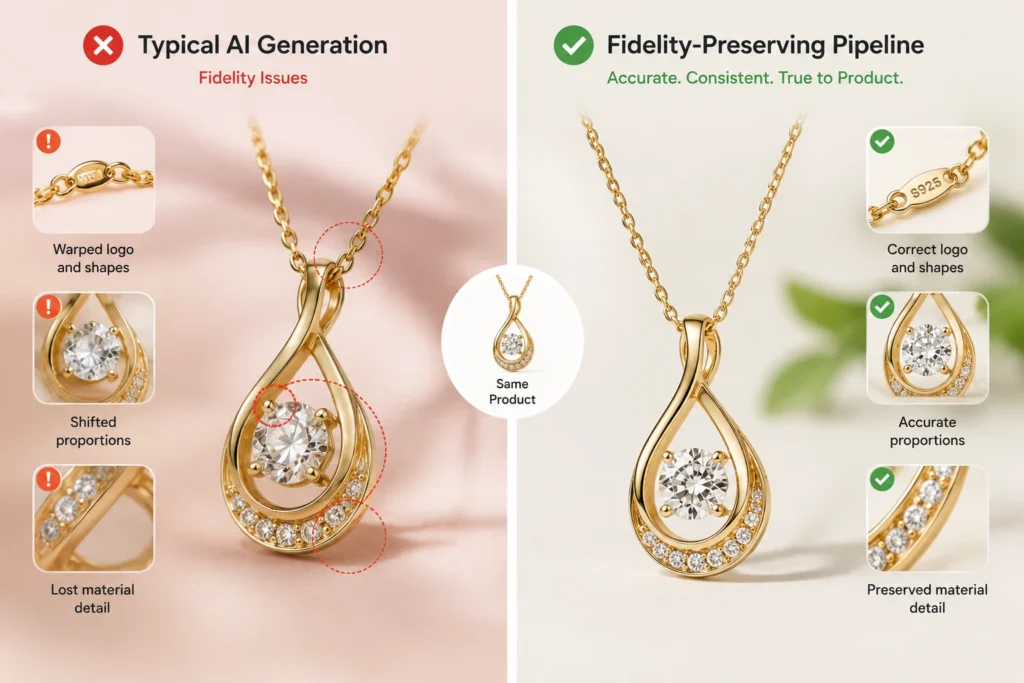
1. Reconstruction instead of preservation Most general AI tools redraw the product from a text description or a single reference rather than anchoring the actual pixels of your product. Anything the model cannot perfectly infer (exact logo artwork, precise proportions, fine surface texture) gets reinvented.
2. Weak handling of text and logos Logos, labels, and packaging text remain one of the most common failure points. Models often render letter-like shapes that look plausible until you try to read them. Distortion rates for text and logos frequently exceed 20% even on top models.
3. Geometry and proportion drift Cylinders become slightly oval. Straight edges bow. Scale relative to props or human models shifts. These errors are subtle on a phone screen but obvious when the product arrives or when multiple images are viewed side by side.
4. Material and texture collapse Leather loses grain. Metal loses accurate reflectance. Fabric weave becomes generic. Glass refraction ignores the real contents. The result is the familiar “plastic” or overly smooth look that customers increasingly associate with AI imagery.
5. Inconsistent lighting and contact shadows Shadows fall in directions that contradict the apparent light source. Reflections do not match surface properties. Edges bleed into the background. These physics violations make the product feel detached from the scene.
6. Single-reference and single-generation limitations One front-view photo cannot reliably inform the back, underside, or fine details. Generating each angle separately compounds identity drift across a product gallery.
These problems are not solved by better prompts alone. They are architectural. Diffusion models optimize for visual plausibility, not object-level accuracy.
The Business Cost of Low Fidelity
Shoppers notice. Research shows a large majority of online buyers expect product photos to match the item they will receive. When images misrepresent color, scale, texture, or details, return rates rise significantly — sometimes by 30% or more in categories such as apparel, jewelry, and home goods.
The damage compounds: higher returns, more “item not as described” claims, platform visibility penalties, damaged reviews, and eroded brand trust. In 2026, marketplaces and consumers have become more sensitive to AI-generated imagery that feels off. Authenticity signals matter more than ever.
How to Improve AI Product Photography Accuracy in 2026
The solution is no longer “use a better prompt.” It is a different pipeline that prioritizes preservation over pure generation.
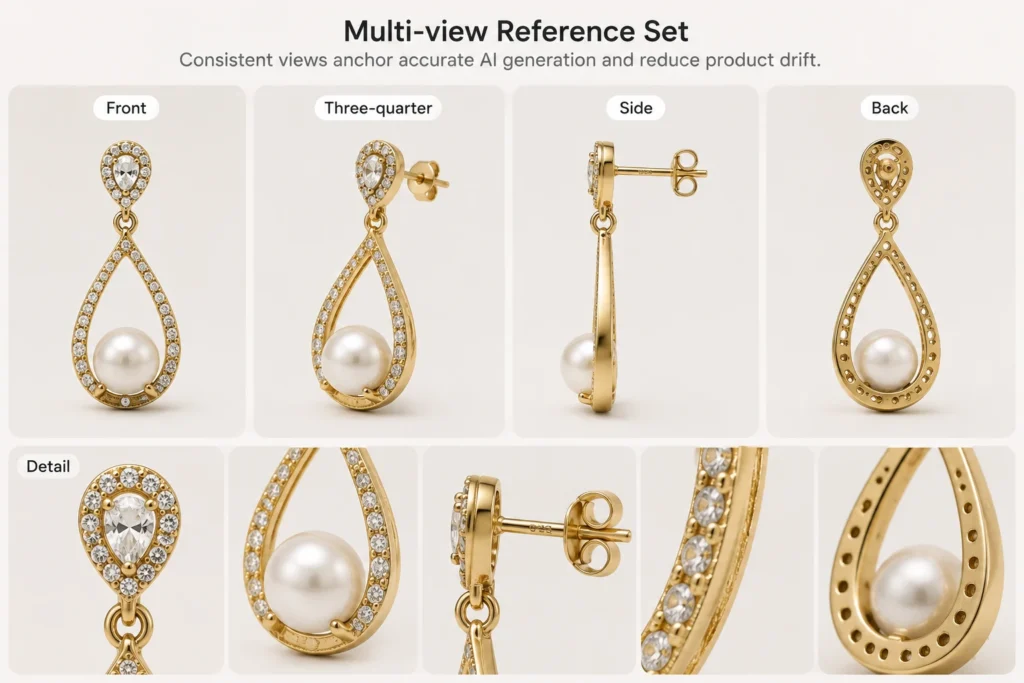

Start with high-quality, multi-angle reference images: Capture or source clean photos of the actual product from multiple views: front, three-quarter, side, back, top, and key detail close-ups. The more accurate geometric and surface information the system has, the less it has to invent.
Use product-aware or preservation-first tools: Specialized platforms designed for ecommerce product photography perform better than general creative AI. They are built to lock product identity while changing only the environment, lighting, or styling. Look for tools that explicitly claim (and demonstrate) they keep the product accurate and unchanged.
Platforms focused on jewelry, fashion, and beauty — categories where fine detail and material accuracy matter most — have made particularly strong progress. Tools that turn ordinary product shots into studio-grade images while preserving exact product appearance reduce the need for heavy manual correction.
Apply identity locks and structured constraints: Treat the product as a fixed identity rather than a flexible subject. Techniques such as multi-reference identity locking, role-specific prompts (one image for structure, another for texture), and explicit “do not alter product” constraints help reduce drift.
Add validation and correction layers: The highest-performing workflows now include a fidelity check: compare the generated image against the original product (or CAD data where available) and flag or correct deviations in logo, color, geometry, or components. Even modest improvements in pass rate translate into large reductions in unusable assets at catalog scale.
Generate one role at a time and maintain consistency systems: Avoid generating a full multi-image set with a single open-ended prompt. Produce packshots, lifestyle scenes, and on-model shots in controlled batches with shared lighting recipes, camera settings, and product locks. Brand kits or style systems that store approved product attributes further reduce variation across hundreds of SKUs.
Review at the right zoom level and across the set: Inspect at 100% zoom for text and edges. Compare multiple angles side by side. Check mobile rendering, because color and compression behavior differ from desktop previews.
A Practical 2026 Fidelity Checklist
Before publishing any AI product image, verify:
- Silhouette and proportions match the real product
- Color and material finish are accurate (including matte vs. gloss)
- All visible logos, text, and labels are legible and correctly rendered
- Components, hardware, seams, and fine details are present and correct
- Scale relative to any props or models is realistic
- Lighting, shadows, and reflections are physically consistent
- The product identity remains stable across the entire image set
Reject any output that invents features or mutates brand elements, even if the overall scene looks attractive.
Where Specialized Platforms Fit
For brands in jewelry, fashion, and beauty — where customers scrutinize texture, metal finish, fabric drape, and packaging details – platforms built specifically for product fidelity deliver higher usable rates and lower downstream correction costs.
Tools like Monoshoot, for example, turn ordinary product shots into studio-grade images for ecommerce, ads, and social while explicitly keeping the product accurate and unchanged.

That preservation-first approach reduces the need for heavy manual fixes and helps maintain consistency across a catalog.
The difference is not just visual quality. It is trust, lower returns, and the ability to scale catalog imagery without accumulating brand-damaging inconsistencies.
Frequently Asked Questions
What is product fidelity in AI product photos?
Product fidelity means the AI-generated image accurately preserves the real product’s shape, proportions, color, material texture, logos, text, and fine details. High fidelity ensures the photo matches what the customer will actually receive.
Why do most AI product photos fail product fidelity?
Most general AI models reconstruct the product from patterns rather than preserving the original pixels. This leads to common errors such as warped logos, distorted proportions, color shifts, missing details, and inconsistent textures — even when the overall image looks polished.
How often do top AI models maintain full product fidelity?
Recent large-scale tests of leading image models in 2026 showed that even the strongest base models preserved full product details in only about 29% of cases. Roughly 7 out of 10 generations contained at least one visible fidelity issue.
Can better prompts alone fix product fidelity problems?
No. While clear prompts help, the core issue is architectural. Diffusion models optimize for visual plausibility, not exact object accuracy. Lasting improvement requires multi-angle reference images, product-aware tools, identity locking, and validation steps.
Do specialized AI product photography platforms perform better on fidelity?
Yes. Platforms built specifically for ecommerce product photography (especially those designed for jewelry, fashion, and beauty) focus on keeping the product accurate and unchanged while improving lighting, background, and presentation. This approach consistently delivers higher usable rates than general creative AI tools.
How many reference photos should I use for accurate AI product images?
Ideally use multiple high-quality views: front, three-quarter, side, back, top, and close-up detail shots. More accurate geometric and surface information reduces the need for the AI to invent details.
Will low-fidelity AI product photos increase returns?
Yes. When images misrepresent color, scale, texture, or details, return rates can rise significantly (often 20–30% higher in categories like apparel, jewelry, and accessories). Customers expect the photo to match the delivered product.
Is it possible to scale AI product photography without losing fidelity across a large catalog?
It is possible when you use a structured pipeline: consistent multi-view references, product identity locks, brand/style systems, and a validation layer that checks outputs against the original product. Without these controls, drift compounds quickly across hundreds of SKUs.
Final Thoughts
In 2026 the question is no longer whether AI can produce beautiful product photos. It can. The question is whether those photos remain faithful to the product customers will actually receive.
Most generic AI workflows still fail that test more often than they pass it. The brands that win are the ones treating fidelity as a first-class requirement: multi-view references, preservation-first tools, identity locks, validation steps, and disciplined review processes.
Product photography has always been about truth-telling. AI has not changed that. It has only made the cost of getting it wrong more visible — and more expensive.
If you are currently generating product imagery with general AI tools and seeing subtle (or not-so-subtle) drift, the fix is available. Start with better references, move to systems built for product accuracy, and measure fidelity the same way you measure conversion.
Accurate images do not just look better. They sell better and keep customers longer.
References
- Photoroom Research (July 2026) “How often do top editing image models maintain product details? Only 29% of the time” https://www.photoroom.com/blog/top-editing-image-models-maintain-product-details-only-28-of-the-time → Main source for the 29% full product fidelity statistic.
- Rewarx – Why AI-Generated Product Photos Hurt Sales (2026) https://www.rewarx.com/blogs/why-ai-generated-product-photos-hurt-sales → Return rate impact, consumer expectations (Salsify data), and trust issues.
- Rewarx – What Causes Product Distortion in AI Images https://www.rewarx.com/blogs/what-causes-product-distortion-in-ai-generated-images → Detailed breakdown of distortion types (proportional, textural, color, feature addition).
- Nightjar – Why AI Product Photos Don’t Match the Real Product https://nightjar.so/blog/why-ai-product-photos-dont-match-real-product → Excellent explanation of why general AI redraws products instead of preserving them.
- Kraflayer – AI Product Photos From References: 7 Fidelity Checks https://kraflayer.com/blog/ai-product-photo-generator-from-reference-image → 7 practical fidelity checks (silhouette, color, text, material, components, scale, light).
- Rewarx – Why AI Photos Look Plastic https://www.rewarx.com/blogs/ai-photos-look-plastic-not-prompt → Lighting, physics, and training data reasons behind the “plastic” look.
- BLKMARKET – Why AI-Generated Product Images Fail Even When They Look “Good” https://blkmarket.au/why-ai-generated-product-images-fail-even-when-they-look-good/ → Text, geometry, and scale failure analysis.
- Rewarx – AI Product Photos Fail on Mobile Shoppers https://www.rewarx.com/blogs/why-ai-product-photos-fail-mobile-shoppers → Color and compression issues on mobile devices.